
How to Share Amazon Prime with Family in 2026

Get deal alerts for brands on our mobile app


Amazon Prime Can Be Shared—But Only Within Your Household
Amazon Family Sharing Rules You Need to Know
Important: Updated June 2026. Amazon Household is now called Amazon Family, and the rules for sharing Prime benefits have changed.
Yes, you can share Amazon Prime with another adult in your household. Amazon Family lets one Prime member share eligible Prime benefits with one other adult who lives at the same primary residential address.
That means you may not need to pay for two separate Prime memberships when you and your spouse, partner, roommate, or another adult in your home already share household expenses.
However, Amazon Family is not designed for sharing Prime with friends or relatives who live somewhere else. Amazon requires Amazon Family members who share Prime benefits to live together at the same primary residential address.
What Is Amazon Family?
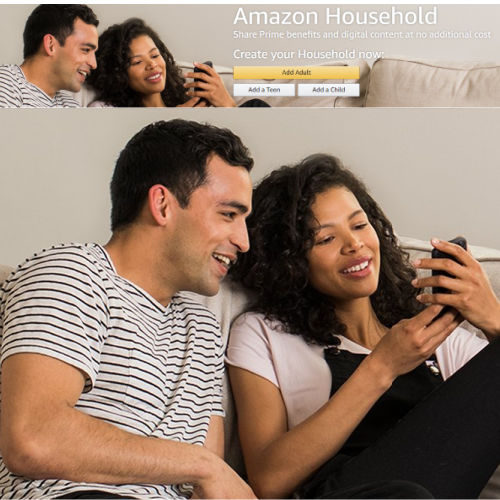
Amazon Family is Amazon’s official way to connect separate Amazon accounts within one household and share eligible Prime benefits and digital content.
It was previously called Amazon Household, so you may still see the older name on some Amazon pages, older articles, or links. The basic idea remains the same: each adult keeps a separate Amazon login while sharing benefits from one Prime membership.
An Amazon Family can include:
- Two adults, including the primary Prime member
- Up to four teen profiles
- Up to four child profiles
The second adult does not need to purchase another Prime membership to use eligible shared benefits. However, both adults must accept Amazon’s account-sharing requirements.
Amazon Family is free to create. You only pay for the Prime membership and any separate services or purchases you choose to add.
Who Can Share Amazon Prime Benefits?
A Prime member can share eligible benefits with one other adult who lives at the same primary residential address.
This may include:
- A spouse
- A domestic partner
- A roommate
- An adult child who still lives at home
- Another adult member of your household
You cannot legitimately use Amazon Family to share Prime shipping with a parent, sibling, adult child, friend, or another person who lives at a different address.
Amazon previously allowed some Prime members to share shipping benefits through an invitee program. That program ended in 2025, so older articles claiming you can share Prime with someone outside your household are no longer accurate.
Do Both Adults Need the Same Address?
Yes. Amazon says the Prime member and the invited adult must live together at the same primary residential address to share Prime benefits through Amazon Family.
Amazon may ask members to verify that they live together. Using Amazon Family with someone at another residence could result in benefits being removed or the household connection being restricted.
How to Share Amazon Prime with Another Adult
You can set up Amazon Family from your Amazon account.
- Visit the Amazon Family management page.
- Sign in to the Amazon account with the active Prime membership.
- Select the option to add an adult.
- Enter the other adult’s name and email address.
- Send the Amazon Family invitation.
- Have the invited adult sign in to their own Amazon account and accept the invitation.
- Both adults must agree to Amazon’s payment-sharing terms.
The invited person should use their own Amazon account rather than signing in with the primary member’s username and password.
Once the invitation is accepted and the accounts are linked, eligible shared Prime benefits should become available to the second adult.
Which Amazon Prime Benefits Can Be Shared?
The second adult in an Amazon Family can receive many of the Prime benefits included with the primary member’s subscription.
Shared benefits may include:
- Prime delivery: Free Prime shipping on eligible purchases
- Prime Video: Access to included Prime Video movies and shows
- Prime Reading: Access to eligible books, magazines, and comics
- Amazon Photos: Eligible photo storage and Family Vault features
- Prime Gaming: Select games, in-game content, and gaming benefits
- Prime-exclusive deals: Access to eligible member prices and promotions
- Prime Day: Access to eligible Prime Day member deals
- Whole Foods Market savings: Eligible Prime-member discounts
The exact benefits available can vary by account, service, location, and Amazon’s current terms.
For a broader look at what comes with a membership, see our Amazon Prime membership benefits guide.
Do Adults Share Payment Methods and Order History?
This is the part you should understand before inviting another adult.
To share Prime benefits and digital content, both adults must agree to share access to payment methods within Amazon Family. Amazon requires this as part of linking the two adult accounts.
That does not mean both adults use the same Amazon login.
Each adult continues to have:
- Their own Amazon username and password
- Their own shopping cart
- Their own recommendations
- Their own order history
- Their own wish lists
- Their own account settings
Adults should only create an Amazon Family with someone they know and trust. Because payment methods can be shared, this is not a good arrangement for a casual friend or temporary roommate.
Can the Other Adult See What I Order?
Adults use separate accounts, and normal adult order histories are not automatically combined into one shared list.
However, shared payment methods, shared digital content, delivery notifications, household devices, or email alerts can still reveal information about purchases. Do not assume Amazon Family makes every activity completely private.
Which Services Are Not Automatically Shared?
Not every Amazon subscription or benefit is included with a standard Prime membership or shared through Amazon Family.
These may require a separate subscription, separate plan, or additional fee:
- Audible memberships
- Kindle Unlimited
- Amazon Music Unlimited
- Amazon Music Unlimited Family Plan
- Prime Video Channels
- Movie rentals and purchases
- Amazon Kids+
- Some promotional credits and account-specific offers
- Rewards attached to a specific credit card account
Prime Video access also does not mean every title on Amazon Video is free. Some movies, shows, live events, and premium channels cost extra.
What Happens If an Adult Leaves Amazon Family?
An adult can leave or be removed from an Amazon Family, but the change may have consequences.
After an adult leaves:
- The primary Prime member keeps the paid membership
- The departing adult loses the shared Prime benefits
- Shared digital content may no longer be available
- Shared payment access is removed
- The adult may need to wait before joining another Amazon Family
Amazon currently states that adults who leave an Amazon Family may face a 180-day waiting period before joining a different one.
Do not remove an adult just to temporarily add someone else without first checking Amazon’s current waiting-period rules.
Can Children and Teens Use Amazon Family?
Amazon Family can also include teen and child profiles, but they work differently from adult accounts.
Teen Profiles
Teen profiles are intended for ages 13–17. Depending on current account availability and Amazon’s rules, teens may be able to shop with parental oversight, use shared payment methods, and receive eligible Prime shipping benefits.
Parents can review or approve teen orders based on the controls selected for the account.
Child Profiles
Child profiles are intended for children under 13 and are primarily used to manage eligible digital content, parental controls, and compatible Amazon devices.
A child profile is not the same as giving a child an unrestricted adult Amazon shopping account.
Does Sharing Prime Save Money?
It can. Standard Amazon Prime currently costs $14.99 per month or $139 per year. Sharing one membership between two eligible adults in the same household may eliminate the need for a second full-price membership.
Before paying for another membership, compare these options:
- Check for an Amazon Prime 30-day free trial
- See whether you qualify for Prime for Young Adults
- Learn about discounted Prime Access
- Compare all ways to get Amazon Prime free or discounted
Amazon Prime Family Sharing FAQ
Can I share Amazon Prime with my spouse?
Yes. You can add your spouse as the second adult in your Amazon Family when you live together at the same primary residential address. Your spouse can use a separate Amazon account while receiving eligible shared Prime benefits.
Can I share Prime with someone who lives at another address?
No. Amazon requires the Prime member and the invited Amazon Family member to live at the same primary residential address.
How many adults can share one Prime membership?
An Amazon Family can include two adults total: the primary Prime member and one additional adult.
Do both adults need their own Amazon accounts?
Yes. Each adult should use a separate Amazon account. You do not need to share your Amazon username or password.
Do adults have to share payment methods?
Yes. Amazon requires both adults to agree to share payment methods to share Prime benefits and digital content through Amazon Family.
Can the second adult shop Prime Day deals?
Yes. An eligible adult receiving shared Prime benefits can shop qualifying Prime Day member offers. See our Amazon Prime Day guide for current dates, early deals, and shopping tips.
Can I share Prime Video without sharing Amazon Prime?
Prime Video offers household viewing options and profiles, but sharing a full Prime membership with another adult is handled through Amazon Family. Separate Prime Video subscriptions and premium channel subscriptions may have different rules.
Can I add a friend to Amazon Family?
Only when that friend is another adult who lives with you at your primary residential address and both of you agree to Amazon’s account and payment-sharing requirements.
Can I remove someone and add another adult immediately?
Not necessarily. Amazon may impose a 180-day waiting period after an adult leaves or is removed from an Amazon Family. Check the warning shown in your account before making the change.
Share Prime Without Paying for Two Memberships
Amazon Family can be a practical way for two adults living together to share eligible Prime benefits without purchasing two full-price memberships.
The most important rules are simple: both adults need separate Amazon accounts, both must live at the same primary residential address, and both must agree to Amazon’s payment-sharing requirements.
Before creating or changing your Amazon Family, review Amazon’s current terms and make sure you trust the person you are adding.
Set Up or Manage Amazon Family
Get the Best Amazon Deals Sent to You
The Fabulessly Frugal app lets you choose the products, brands, and categories you want to follow. We will notify you when we find a deal worth checking.
- Download the free Fabulessly Frugal app
- Select the brands, products, and deal categories you want
- Get notified when we post matching deals and price drops
Want Amazon deals, Prime Day alerts, and more money-saving tips delivered straight to your inbox?
Related Deals

















Report a Problem
Please select the problem you are facing with this deal:
- Price Increased
- Price Decreased
- No longer available
- Expired
- Link doesn't work
- Suggestion
- Compliment
- Other
Add more details:
Thank you for your feedback. We really appreciate it.
Enter your email address if you would like
to receive a follow up.
Please Try Again
Thanks for providing the email address.
We will reach out to you as soon as possible.


Popular


Recommended


About Us

At Fabulessly Frugal, our goal is to help you live HEALTHY, WEALTHY, and WISE! My team and I work hard to bring you the best, online deals, clean eating, DIY's, freezer meal recipes, and more! I LOVE coaching and inspiring people to improve their health in my fitness challenge! You should also check out my favorite cleanse! Learn more about me and the rest of my team.


Copyright © 2008–2026
Fabulessly Frugal: A Coupon Blog Sharing Gift Ideas, Amazon Deals, Printable Coupons, DIY, How to Extreme Coupon, and Make Ahead Meals. All rights reserved