
Upside App Review: Get Cash Back on Gas, Groceries, and Restaurants

Get deal alerts for brands on our mobile app


Get Cash Back on Gas, Groceries, and Restaurants with Upside
Gas, groceries, and eating out are expenses most of us cannot completely avoid, so why not earn some of that money back?
The free Upside app gives you cash-back offers at participating gas stations, grocery stores, convenience stores, and restaurants near you. Instead of clipping coupons or changing where you shop, you can check the app before making an everyday purchase and see whether there is an offer available nearby.
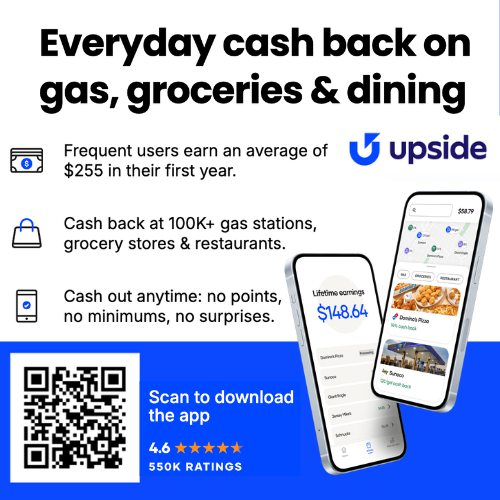
Download Upside and use referral code TB9BB to unlock a bonus of 15¢ per gallon in extra cash back on your first gas fill-up, plus 10% extra cash back on your first qualifying restaurant or grocery purchase.
DOWNLOAD UPSIDE AND USE CODE TB9BB
What Is the Upside App?
Upside is a free cash-back app that rewards you for making qualifying purchases at participating businesses. Available offers may include cash back on:
- Gas and convenience-store purchases
- Groceries
- Restaurants and takeout
Open the app when you are getting ready to fill your tank, buy groceries, or grab something to eat. Upside will show you participating locations and the cash-back offers currently available near you.
The cash back is funded by participating retailers that use Upside to attract customers. After your qualifying purchase is verified, the cash back is added to your Upside account.
How Does Upside Work?
Using Upside only takes a few extra steps before making a purchase:
- Open the app. Browse the available gas, grocery, convenience-store, and restaurant offers near you.
- Claim your offer. Select the exact participating location before you make your purchase.
- Shop and pay as usual. Use an eligible credit or debit card associated with your Upside account.
- Complete any required verification. Depending on the offer, you may need to check in, select the card you used, or upload a receipt.
- Receive your cash back. Once the transaction is verified, your earnings will appear in your Upside account.
Helpful tip: Keep your receipt until the cash back finishes processing. Most importantly, remember to claim the offer in the app before you pay.
Why Team Fabulessly Frugal Loves Upside
We are always looking for practical ways to save money without adding a complicated routine. Upside stood out because it can be used on purchases we were already planning to make.
BJ Saved More Than $13 on His First Fill-Up
BJ is taking a roughly 2,000-mile road trip with his family this summer, so fuel expenses can add up quickly. He downloaded Upside to look for gas and food offers along the route and earned more than $13 back on his first gas stop alone.
That is a meaningful amount of money back from one purchase he needed to make anyway. On a long road trip with multiple fill-ups, even smaller offers can add up.
Stacy Found Offers at Places She Already Visits
Stacy was surprised by how many nearby gas stations and familiar restaurants appeared in the app.
Her reaction was basically, “How did I not know about this sooner?” She found cash-back opportunities at places where she already eats and plenty of participating gas stations close to home. There was no need to drive across town or completely change her routine just to use the app.
Why Upside Is Worth Checking Before You Shop
- Earn actual cash back: Rewards are added to your Upside balance rather than issued as store points that can only be used at one business.
- Save on necessary purchases: Look for offers on gas, groceries, restaurant meals, and other purchases already in your budget.
- Find nearby offers: The app shows participating locations and available savings in your area.
- Stack eligible rewards: Many offers can be used alongside your usual credit card rewards and participating retailer loyalty programs.
- Choose how to cash out: Available redemption methods may include a bank transfer, PayPal, or digital gift cards.
- There is no cost to download: Upside is free to install and use.
Can You Stack Upside with Other Rewards?
In many cases, yes. You can pay with a rewards credit card and continue earning the card’s usual points, miles, or cash back while also earning through Upside.
Some retailer loyalty programs and coupons may also work with Upside. However, combining promotions can sometimes reduce the amount of cash back awarded, so check the terms shown with each offer before making your purchase.
How Do You Get Your Money from Upside?
Once cash back has been credited to your Upside account, you can select an available cash-out method. Options may include:
- Bank transfer
- PayPal
- Digital gift cards
Upside may charge a small fee for certain lower-value cash-outs, while some redemption options or higher cash-out amounts may have no fee. Review the cash-out details displayed in your account before confirming your withdrawal.
See What Upside Offers May Look Like
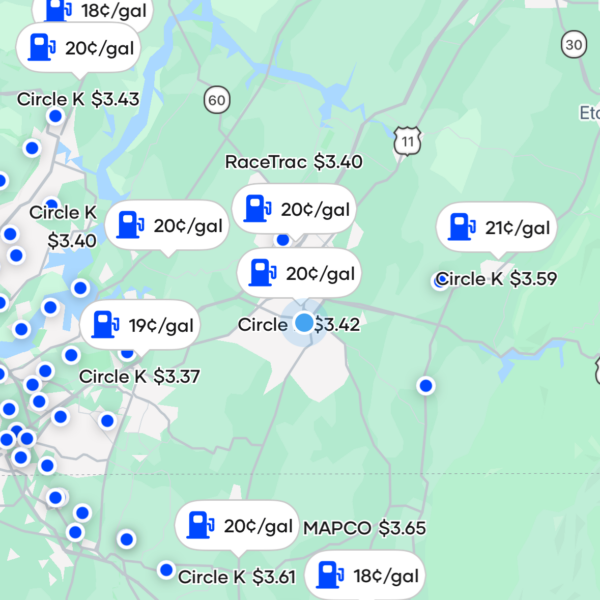
Here is a screenshot showing some of the recent offers available to one of our team members. Your offers will vary based on your location, the participating businesses nearby, and the promotions currently available.
How to Get the Upside New-User Bonus
- Download the free Upside app here.
- Create your account.
- Enter referral code TB9BB.
- Find and claim a qualifying nearby offer before making your purchase.
- Pay with an eligible credit or debit card and follow the app’s verification instructions.
New users who qualify can receive 15¢ per gallon in extra cash back on their first gas fill-up and 10% extra cash back on their first restaurant or grocery purchase.
Remember to use referral code TB9BB
Frequently Asked Questions About Upside
Is the Upside app free?
Yes. Upside is free to download and use. You do not need to purchase a paid membership to browse and claim offers.
Is Upside legitimate?
Yes. Upside partners with participating retailers that fund the cash-back offers available through the app. Users claim an offer, make a qualifying purchase, and receive cash back after the transaction is verified.
Do I have to buy something I was not already planning to purchase?
No. The best way to use Upside is to look for offers at businesses you already plan to visit. Check the app before filling up, grocery shopping, or ordering food and compare the available locations.
Do I need to claim the offer before paying?
Yes. Claim the offer for the correct location before making your purchase. Some fill up fast (like popular local restaurants) so be quick if otu see an offer you want to claim. Upside needs the claimed offer to match your transaction with the participating retailer’s promotion.
Am I obligated to use an Upside offer after I claim it?
No. Claiming a standard Upside offer does not require you to make a purchase. If you change your mind, choose another location, or do not shop within the offer’s time limit, you can simply let the offer expire.
For offers marked “Pay with Upside,” generating an offer code may temporarily initiate a payment transaction. If you create one by mistake and do not use it, Upside says it will automatically cancel and refund the transaction after four hours.
Can I pay with cash?
Upside generally requires payment with an eligible credit or debit card so the transaction can be verified. Cash purchases typically do not qualify.
Does every part of my purchase earn cash back?
No. Exclusions may apply. Depending on the location and offer, items such as gift cards, taxes, tips, service charges, delivery fees, prescriptions, lottery tickets, tobacco products, and certain other purchases may not qualify.
Can I use Upside for restaurant delivery?
Orders made through third-party delivery services may not qualify. Check the specific offer terms and consider ordering or paying directly through the participating restaurant when required.
How quickly will my cash back appear?
Processing time varies by retailer and verification method. Some purchases are confirmed quickly, while others may take several business days. Keep your receipt until the offer is fully processed.
Bonus eligibility, participating merchants, qualifying purchases, cash-back amounts, redemption options, and offer availability may vary. Review the current offer terms in the Upside app before completing your purchase.
Get More Deals
- Download the free Fabulessly Frugal app.
- Select the types of deals and brands you want to follow.
- Let us find the deals and notify you when the products you want cost less.

Related Deals









Report a Problem
Please select the problem you are facing with this deal:
- Price Increased
- Price Decreased
- No longer available
- Expired
- Link doesn't work
- Suggestion
- Compliment
- Other
Add more details:
Thank you for your feedback. We really appreciate it.
Enter your email address if you would like to receive a follow up.
Please Try Again
Thanks for providing the email address.
We will reach out to you as soon as possible.


Loading deal…
Popular


Recommended


About Us

At Fabulessly Frugal, our goal is to help you live HEALTHY, WEALTHY, and WISE! My team and I work hard to bring you the best, online deals, clean eating, DIY's, freezer meal recipes, and more! I LOVE coaching and inspiring people to improve their health in my fitness challenge! You should also check out my favorite cleanse! Learn more about me and the rest of my team.


Copyright © 2008–2026
Fabulessly Frugal: A Coupon Blog Sharing Gift Ideas, Amazon Deals, Printable Coupons, DIY, How to Extreme Coupon, and Make Ahead Meals. All rights reserved